
You’re pitching a design concept to a client. You’ve got fabric swatches, paint samples, and a mood board. The client squints at your 2D floor plan. They nod politely. They say they’ll “think about it.”
You know what happens next. They don’t commission the project. They couldn’t visualise it. They couldn’t see themselves in that space.
This happens constantly in interior design. Clients struggle to translate drawings and samples into actual rooms. They need to see the finished space before they commit. And increasingly, the designers who win projects are the ones showing clients photorealistic renders, not sketches.
3D rendering isn’t new technology. But it’s become essential. Interior designers who don’t use it are losing projects to those who do. Not because the other designers are better. Because they’re showing clients what the other designers are only describing.
What 3D Rendering Actually Does for Interior Design
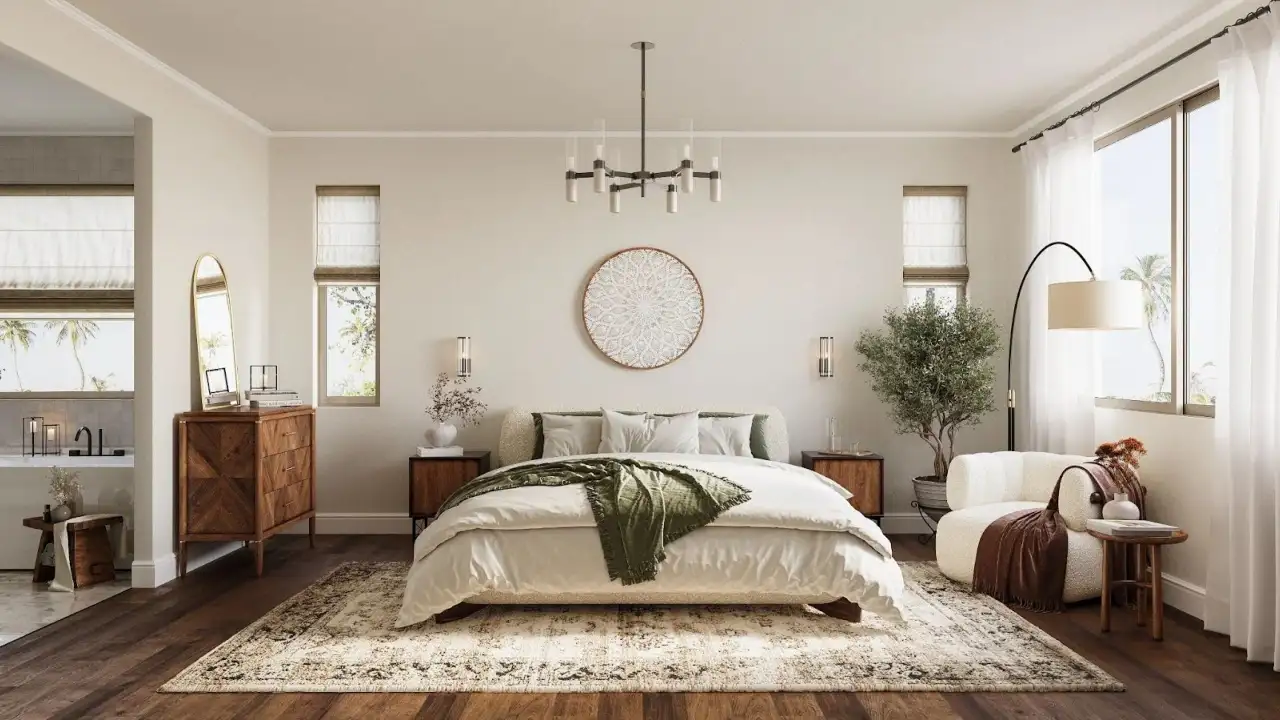
3D rendering creates photorealistic images of spaces that don’t exist yet. You design a room digitally—furniture, finishes, lighting, accessories—and the software generates an image that looks like a photograph.
Clients see exactly what they’re getting. No imagination required. No “trust me, it’ll look amazing when it’s done.”
The difference isn’t subtle. A client looking at a 2D plan sees lines and dimensions. A client looking at a 3D render sees their future living room, with sunlight streaming through the windows at 3 PM, their chosen sofa positioned just so, the paint colour they agonised over looking exactly right.
Professional 3D rendering services for interior designers handle this work for you. You provide specifications—dimensions, materials, furniture selections, lighting—and receive renders showing the complete designed space.
Why Interior Designers Are Using Rendering Now
Five years ago, 3D rendering was optional. Now it’s standard. Here’s why the shift happened:
Clients expect it. They’ve seen renders on Instagram, Pinterest, property websites. When you show up with drawings, you look outdated. When you show renders, you look professional.
Competition uses it. Your competitor down the road is showing photorealistic renders. You’re showing sketches. Who wins the project?
Remote consultations became normal. Post-2020, many design consultations happen remotely. You can’t hand someone fabric samples through a screen. But you can show them a render with those exact fabrics already applied.
Renovation uncertainty increased. Homeowners are nervous about committing to expensive work without certainty. A render gives them that certainty. They see the finished room. They know it works. They proceed.
Materials got more complex. Twenty years ago, you might have specified “cream walls, oak flooring.” Now clients want specific shades, textures, finishes. Renders show these precisely.
A designer told me she switched to using renders in 2021. Her project conversion rate went from 40% to 65%. Same design quality. Same pricing. The only difference was showing clients renders instead of mood boards.
That’s not a small difference. That’s nearly doubling your successful pitches.
The Real Cost of Not Using Rendering
Let’s be clear about what happens when you don’t use rendering.
You lose projects to designers who do. Simple as that. A client sees your concept via drawings. They see your competitor’s concept via photorealistic renders. Even if your design is better, the competitor’s presentation is stronger. They win.
Clients take longer to decide. Without clear visualization, clients hesitate. They ask for more samples. They want to “sleep on it.” Projects drag out. Your time gets wasted on revisions that wouldn’t be needed if they’d seen a clear render from the start.
Revision costs multiply. The client sees the finished room. “I thought the blue would be lighter.” “The sofa looks too big.” “Can we change the lighting?” These revisions cost you time and money. A render would have caught them before installation started.
Your professional credibility drops. Clients expect modern tools. When you can’t show them a render, they question whether you’re keeping up with industry standards.
A designer lost a major kitchen project last year. The client chose another designer whose renders showed exactly how the new layout would work with their existing appliances. The first designer’s hand-drawn plans were accurate. But the client couldn’t visualize them. Visual clarity won the project.
What Actually Goes Into a Quality Interior Render
Not all renders are equal. Poor quality renders look fake—plasticky, overly perfect, obviously computer-generated. Good renders look like photographs. Here’s what makes the difference:
Accurate materials. Fabric textures need to show weave patterns. Wood grain should look natural, not repetitive. Stone should have realistic variation. Metal needs proper reflectivity. These details separate professional renders from amateur work.
Proper lighting. Natural light streaming through windows behaves in specific ways. Shadows have soft edges. Light bounces off surfaces. Artificial lighting creates distinct pools of illumination. Renders need to replicate this accurately.
Realistic styling. A room with perfectly placed accessories looks staged and fake. Good renders include some asymmetry—books slightly askew, cushions not perfectly positioned, that lived-in quality that makes spaces feel real.
Correct scale. Furniture proportions need to match reality. A sofa that’s too large for the room becomes obvious in a render. Ceiling heights, window sizes, doorways—all need accurate dimensions or the image looks wrong.
Appropriate imperfection. Real rooms have slight variations. Paint isn’t perfectly uniform. Wood has knots and grain patterns. Renders that are too perfect look computer-generated. Adding subtle imperfection creates realism.
Professional rendering services understand these details. Amateur renders often miss them. The quality difference is immediately visible.
When You Actually Need 3D Rendering
Rendering isn’t required for every project. But it’s essential for specific situations:
High-value residential projects. When a client is spending significant money on a room redesign, they need confidence before committing. Renders provide that confidence.
Commercial fit-outs. Business clients making decisions about office or retail spaces need board approval. Renders make approval easier—decision makers see the finished space, not abstract plans.
Complex spatial changes. Knocking through walls, adding extensions, reconfiguring layouts—clients struggle to visualise these. Renders show exactly how the new space works.
Material-heavy projects. When you’re specifying multiple finishes, fabrics, colours, showing them all together in a render prevents unpleasant surprises later.
Remote clients. If you can’t meet face-to-face, renders become your primary communication tool. They replace the tactile experience of viewing samples in person.
Planning applications. Some local authorities request visualization for planning permission, especially for protected areas or heritage buildings. Renders satisfy this requirement.
A designer uses renders for all projects over a certain value threshold. Below that, mood boards suffice. Above it, clients expect and need photorealistic visualization.
How Designers Actually Get Renders Made
You’ve got three options:
Learn to do it yourself. This requires learning software like SketchUp, 3ds Max, or Blender, plus rendering engines like V-Ray or Corona. Expect 6-12 months to become proficient. Ongoing time investment: significant. Most practising designers don’t have spare capacity for this.
Hire a dedicated in-house renderer. Only viable for larger firms. A full-time renderer represents significant annual cost plus software licenses. Small firms can’t justify this expense.
Outsource to professional rendering services. Most cost-effective option for solo designers and small studios. You provide specifications, receive renders within 5-10 days. Typical cost: £200-500 per image depending on complexity.
The outsource option works for most interior designers. You maintain design control. You don’t need technical rendering skills. You pay only for what you need.
What Information Rendering Services Actually Need
If you’re outsourcing rendering, here’s what you’ll provide:
Accurate dimensions. Floor plans with measurements. Ceiling heights. Window and door sizes and positions.
Material specifications. Exact paint colours (with codes), flooring types, fabric selections, finish details. The more specific, the better.
Furniture selections. Product names, manufacturers, dimensions. Or CAD files if you have them. Photos work if specific products aren’t confirmed yet.
Lighting plan. Natural light sources (windows, skylights), artificial lighting positions and types. Include dimmer settings if relevant.
Style direction. Reference images showing the aesthetic you want. Contemporary? Traditional? Minimalist? Industrial?
Camera angles. Which views of the room do you want rendered? Typically 2-3 angles capture a space comprehensively.
The more detailed your specifications, the faster and more accurate the rendering process. Vague briefs lead to multiple revisions. Precise briefs get you usable renders quickly.
Typical Timeline and Costs
For a standard residential interior (single room, moderate complexity):
Timeline: 7-10 working days from briefing to final images. Rush service (3-5 days) costs 30-50% more.
Cost: Professional quality renders typically cost several hundred per image. More complex scenes (large open-plan spaces, intricate details, lots of custom elements) run higher.
Revisions: Most services include 2-3 rounds of minor adjustments. Major changes (different furniture, complete layout modifications) are priced separately.
Package deals: Many rendering services offer better rates for multiple images. Buying images in packages usually costs less than individual pricing.
Compare this to losing a project. If rendering costs a few hundred but wins you a significant commission, the ROI is obvious.
What Clients Actually Think When They See Renders
I’ve sat in enough client presentations to know how this plays out.
Without renders: Client looks at your drawings. Nods uncertainly. Ask questions about how it’ll actually look. Requests time to think. Calls back a week later wanting modifications. Eventually commits hesitantly or chooses someone else.
With renders: Client sees the images. Their faces change. “Oh, that’s exactly what I wanted.” Decision made in the room. Project proceeds.
The difference is dramatic. Clients seeing renders understand immediately whether the design works for them. Uncertainty evaporates. Decision speed increases.
A designer showed me her project pipeline. Clients who saw renders during the initial presentation committed 70% of the time. Clients who didn’t commit 35% of the time. The rendering investment paid for itself many times over in won projects.
The Mistakes Designers Make With Rendering
These are the common errors:
Using cheap or free rendering tools. Results look amateurish. Clients notice. You’ve undermined your professional credibility.
Showing renders that don’t match specifications. If your render shows one fabric but you’re specifying another, client expectations won’t align with reality. This creates problems later.
Over-promising on renders. Saying “I’ll have renders tomorrow” when professional services need a week sets false expectations. Be realistic about timelines.
Not using renders at all. The biggest mistake. You’re competing with designers who do use them. You’re disadvantaged before you start.
Showing too many options. Three rendered options are helpful. Ten are overwhelming. Clients need guidance, not paralysis.
When Rendering Doesn’t Replace Other Tools
Renders aren’t magic. They don’t replace:
Physical samples. Clients still need to touch fabrics, see paint colours in their actual lighting, and test furniture comfort. Renders show how materials look together. They don’t replace the tactile experience.
Technical drawings. Builders and contractors work from dimensions and specifications, not from renders. Renders communicate design intent. Technical drawings communicate construction requirements.
Site visits. You still need to see the actual space, measure properly, understand how light moves through rooms at different times. Renders supplement site work. They don’t replace it.
Client conversations. Renders facilitate discussion. They don’t replace the need to understand what clients actually want and need.
Think of rendering as a presentation tool, not a replacement for design skill or process.
The Professional Standards You Should Expect
Good rendering services deliver:
Photorealistic quality. Images that could pass for photographs. No obviously fake elements, no plasticky textures, no strange shadows.
Accurate materials. Fabrics, finishes, colours matching your specifications precisely.
Proper lighting. Natural and artificial light behave realistically, creating appropriate mood and atmosphere.
Multiple revisions. Opportunity to adjust details until the image perfectly represents your design intent.
Source files. High-resolution images suitable for printing and client presentation.
Reasonable timelines. Professional turnaround without excessive delays.
If a rendering service can’t deliver these standards, find one that can. Your professional reputation depends on presentation quality.
What Actually Happens Next
If you’re not currently using 3D rendering, here’s the practical path forward:
Start with one project. Choose an upcoming pitch for a valuable client. Commission renders for that presentation. See how the client responds.
Find a reliable rendering service. Research options. Check portfolios. Ask for quotes. Establish a relationship with someone who understands interior design work.
Build rendering into your pricing. Factor rendering costs into project proposals for higher-value work. Clients paying for quality design accept this as part of professional service.
Use renders strategically. Not every project needs them. But high-value work, complex changes, remote clients—these situations demand visualization.
Track conversion rates. Monitor how often clients seeing renders commit versus those who don’t. The data will confirm what most designers already know: renders increase project wins.
The interior design market is competitive. Clients have choices. The designers’ winning projects are those communicating design intent clearly and convincingly.
Renders do that. Drawings and mood boards don’t, not anymore.
Your design skills haven’t changed. But client expectations have. Using professional 3D rendering brings your presentation up to current professional standards.
It’s not about being fancy. It’s about being clear. Clients choosing to invest thousands in interior design deserve to see what they’re getting. Renders show them.
The question isn’t whether rendering is worthwhile. The question is whether you can afford to keep pitching without it while your competitors use it to win the projects you’re losing.